The Terror of TERRL And What You Need To Know
Recruiters, your business relies on email to send job alerts, attract talent, and support your BDM activity. And if you’re doing this through Microsoft 365, you’re probably sitting on a ticking time bomb. And no, that’s not being too dramatic. Let me explain.
Microsoft has rolled out a sneaky new email policy that caps how many external emails your business can contact each day via Microsoft 365. It’s called the TERRL — Tenant External Recipient Rate Limit — and it’s already being enforced across tenants.
If your team uses Outlook, CRM, or any other tool that sends through your Microsoft 365 account, this limit applies to every. single. one. of those emails.
In short, Microsoft has dramatically throttled how many external emails you can send in a day. You’re used to a world where every person in your business could send up to 10,000 emails a day be it internal of external. Not anymore.
You might even already be seeing the fallout. See those undeliverable reports? It might be Attack Of The TERRL.
In addition to TERRL, Microsoft has also announced the Mailbox External Recipient Rate Limit (MERRL), which restricts each mailbox to sending emails to 2,000 external emails per day. This will hit new 365 customers from October 2025 and be forced to everyone else by April 2026. This will mean that even if your organisation’s overall limit hasn’t been reached, individual users may still encounter sending restrictions.
We cover MERRL in this article if you want to get ready. Read on below for more about TERRL.
See Your TERRL Risk in 60 Seconds
You need to see where you stand today and it’s really easy check how close you are to Microsoft’s new daily sending cap:
- Log in to Microsoft 365 with an admin account
- Head to this report:
Outbound External Recipients Report - Set it to a 7-day or 30-day view
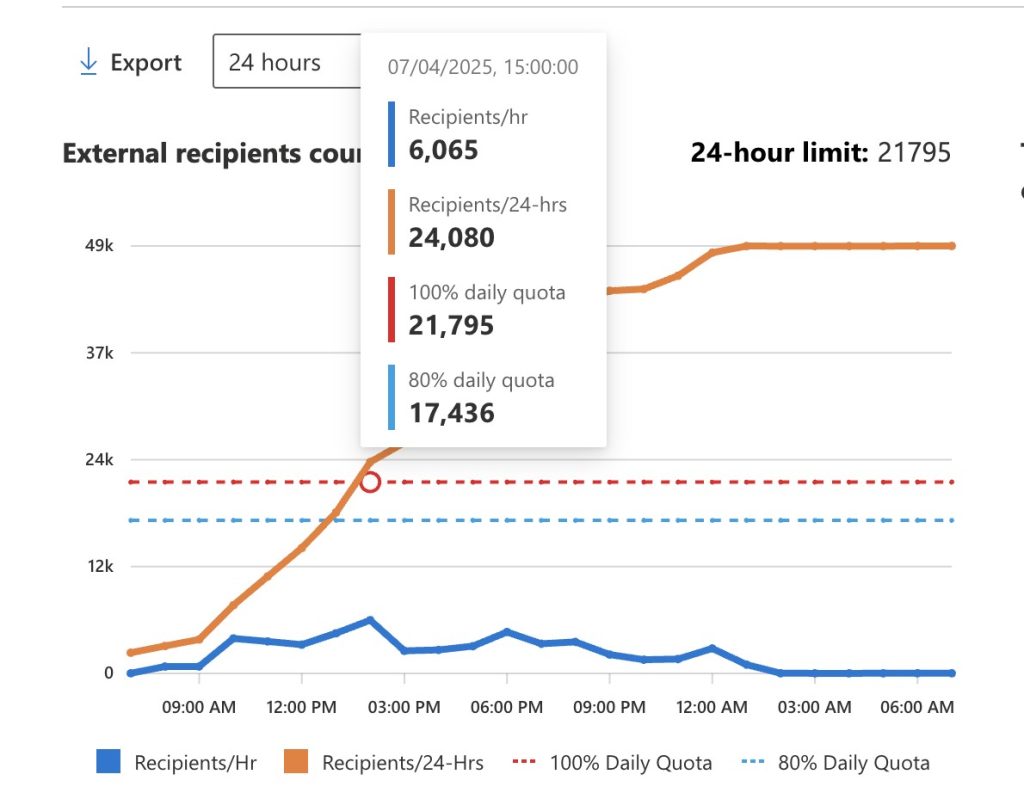
You’ll see a graph that looks something like this.
It shows you what your send limit is and where you are against that. You can look back up to 30 days to see what’s been going on.
So How Is The Limit Calculated?
Microsoft calculates your TERRL like this:
TERRL = 500 × (Number of Licences ^ 0.7) + 9,500
Yeah. I needed a calculator too. Let’s look at an example…
So if you’ve got 100 Microsoft 365 licences, your TERRL is around 22,000 external emails per day. That might sound like a lot — until you do the math:
- 5 recruiters sending 200 emails each = 1,000
- Daily job alerts to 10,000 candidates = halfway gone
- Add in marketing, nurture sequences, and client comms? You’re toast.
Note; this calculation is on paid licences. If you have trial licences, they add sweet FA to your TERRL limit.
Try Our Free TERRL Calculator
Don’t want to wrestle with formulas? We’ve built a quick calculator so you can:
- Calculate your current TERRL
- See how many extra licences you’d need to safely scale up to the limit you need
- Check the cost using the cheapest licence (Exchange Online Plan 1 – £3.10/month)
Simply enter the number of 365 licences you currently have that contain an Exchange Online licence and then enter the number of external emails you might need to hit in a 24 hour window from 365. Common Licences that include Exchange Online are:
- Exchange Online Plan 1
- Business Basic, Standard and Premium
- E3 and E5
TERRL Calculator
Already Near the Limit?
Here’s how to avoid Microsoft turning off the tap:
1. Add more licences – simple but effective (but costs you)
Upping your licences inceases your limit. Use the calculator to see how many more you need.
Looking for an IT company to better manage your 365 licences? Reach out to our partner Nxt Gen IT.
2. Stop Sending Bulk Outreach from 365 – you probably shouldn’t be doing it anyway
Microsoft have always been pretty clear that their 365 service is not designed for bulk sending. This recent move enforces that approach. You may already have other platforms you use for mass mail, like a CRM or dedicated email marketing tools. Use those more but be wary of high bounce rates and spam reports. Your provider might not like it.
Using other delivery engines means they don’t count toward your Microsoft limit.
Need to review your tech stack? Get in touch and see how our partner network can help you.
2. Use a Third-Party Relay Service Plugged into 365 – Effective but needs tech time
Want to keep sending from 365 but not get throttled? There are ways of connecting third-party services to 365, and using them for some (or all) of your outbound. Please note, that you’ll then be missing some of the backend features in 365, like email logs and auditing. It takes some setup, but you’ll be back in control. These are the top services used in recruitment:
- SendGrid
- Mailgun
- Postmark
- Azure Communication Services
Need help with implementing changes like these? Get in touch.
TL;DR for Recruiters
Microsoft just quietly imposed a speed limit on your recruitment emails. And if you don’t know your current volume, you could already be over it.
Check your usage, calculate your limit, and act fast if you’re anywhere close. This isn’t something you want to find out about after your deliverability tanks.
Need help figuring it out or fixing it? We’ve got you.