
Your candidates aren’t ignoring your emails. A lot of them never saw them.
Email deliverability is the gap between hitting send and actually landing in the inbox. For most businesses, it is a background concern. For recruitment agencies, it is a commercial one. Every email that goes to spam is a candidate who missed the role, a client who didn’t get your update, a retainer conversation that never happened.
The good news is that most deliverability problems are fixable. The frustrating part is that they are often invisible until the damage is done. This guide covers everything a recruitment agency needs to understand… why recruiters face a harder problem than most, what the common failure points are, what the tools in your stack are doing to your reputation, and what getting it right actually looks like.
Why Recruiters Have a Harder Deliverability Problem Than Most
Most businesses send email to people who have opted in and expect to hear from them. Recruitment agencies mostly don’t. Whether you are sourcing candidates, pitching clients, or following up on live roles, a large proportion of your email is cold. That changes the deliverability equation significantly.
- You send cold. Unsolicited email gets lower open rates, more spam reports, and less engagement – all of which are signals inbox providers use to decide where your next email goes. You start with a structural disadvantage that most email advice doesn’t account for.
- Your volumes spike. Recruitment operates in bursts. A vacancy opens, you send a campaign to 300 candidates. Then nothing for a week. These irregular patterns look suspicious to inbox providers until you have built enough sending history to justify them.
- You run multiple domains. A primary domain for client correspondence, a separate domain for outreach, perhaps a subdomain configured by your CRM. Each one needs its own reputation built from scratch and each one is a potential weak point.
- Your list quality varies. Recruitment databases accumulate quickly and age fast. LinkedIn exports, legacy CRM data, lapsed candidates often contain invalid addresses that push up bounce rates and damage reputation faster than almost anything else.
- You rely on third-party sending infrastructure. Bullhorn, Vincere, Loxo, TrackerRMS, Sourcewhale, Atlas and the cold email tools built on top of them all have their own sending architectures. How they are configured, and whether that configuration aligns with your domain’s authentication records, directly affects where your email lands.
The result is that a recruitment agency sending at reasonable volume can have its deliverability degrade without a single obvious trigger. A combination of modest bounce rates, low engagement, and slightly misconfigured authentication across a multi-tool stack is enough to quietly push you into spam folders over weeks and months.
The Recruitment Tech Stack and What It Means for Deliverability
Most recruitment agencies have layered their sending infrastructure over time, often without a deliverability specialist ever reviewing it. The result is typically a mix of tools that each introduce different risks and that rarely interact in ways anyone planned for.
| Tool / Platform | Category | What to check |
| Bullhorn | CRM / ATS | Sending infrastructure may use shared IP pools. Authentication setup varies by configuration and needs verifying against your DNS records. |
| Vincere | CRM / ATS | Similar to Bullhorn but mostly sends through your existing mailboxes. Check to see what has been configured on the backend. |
| Loxo | CRM / ATS | Cloud-native platform with its own sending layer. Confirm it is authorised in your SPF record and that DKIM is configured correctly. |
| TrackerRMS | CRM / ATS | Check whether email sends from your domain or TrackerRMS infrastructure, and whether authentication is set up accordingly. |
| Atlas | CRM / ATS | Adds another layer to the sending chain. Needs to be included in SPF, and DKIM alignment should be verified. |
| Instantly | Cold email | Built with deliverability in mind but still requires proper domain setup and warm-up. Running it from a cold domain will produce poor results regardless of the tool. |
| Sourcewhale | Outreach | Automates sequences at scale through your own mailbox. Volume patterns can accelerate reputation damage if underlying authentication is misconfigured. |
A common scenario I encounter at Quinset is an agency running two or three of these tools simultaneously, each sending from the same domain, with authentication records that were set up once years ago and never reviewed as the stack changed. A new platform gets added, its sending server never gets added to the SPF record, and every email it sends is quietly failing authentication checks.
The Most Common Email Deliverability Problems in Recruitment
| Problem | What it looks like | Common cause |
| Spam folder placement | Low open rates, no replies, campaigns vanish with no error | Missing or misconfigured SPF, DKIM or DMARC, poor domain reputation, content triggers |
| High bounce rates | Increasing undeliverable errors, CRM flagging bad addresses | Stale list data, no email validation before sending |
| Domain reputation damage | Gradual open rate decline across all campaigns over weeks or months | Spam complaints, high bounce rates, poor or absent warm-up |
| M365 sending limits | Emails stop mid-campaign, MAILER-DAEMON errors from Exchange Online | Hitting the external recipient rate limit – lower than most agencies expect |
| Good open rates, low engagement | Apparent 60-80% opens but no replies or clicks | Security filters and scanners pre-loading tracking pixels |
| Links triggering spam filters | Emails with links perform worse than plain text versions | Shortened URLs, third-party tracking domains, too many links per email |
It is worth noting that these problems rarely appear in isolation. A high bounce rate damages domain reputation. A damaged domain reputation causes more spam placement. Spam placement leads to lower engagement, which further damages reputation. The loop is self-reinforcing, which is why early intervention matters.
What Actually Determines Whether Your Email Lands in the Inbox
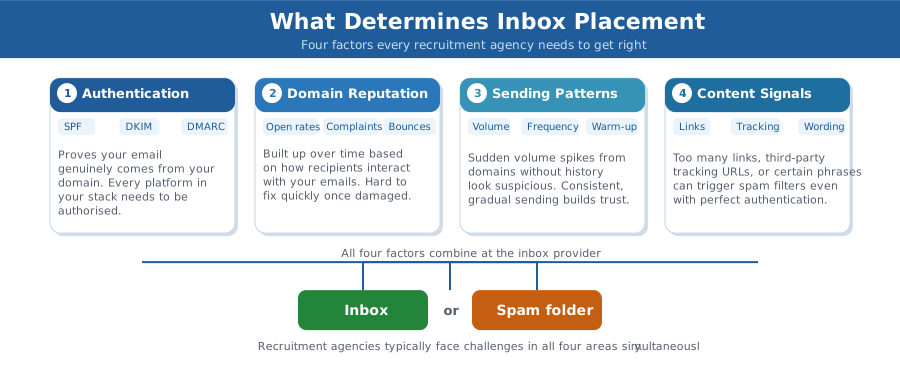
Inbox placement is not random. It is the result of a scoring system that evaluates several factors simultaneously. The graphic below summarises what those factors are and why recruitment agencies typically face challenges in all four at once.
Authentication
Authentication is the foundation. SPF, DKIM, and DMARC are the three DNS records that tell receiving mail servers your email genuinely comes from your domain and what to do if it doesn’t. Without all three correctly configured, you are asking mail servers to trust you on faith.
SPF (Sender Policy Framework) lists the servers allowed to send on behalf of your domain. If Sourcewhale or Instantly is sending from your domain but isn’t included in your SPF record, those emails fail authentication. The same applies to Bullhorn, Vincere, Atlas, and any other platform in your stack.
DKIM (DomainKeys Identified Mail) adds a cryptographic signature to every email, proving it hasn’t been tampered with in transit. Most platforms can generate a DKIM key but it has to be added to your DNS correctly, and it has to match what the platform is actually using.
DMARC ties SPF and DKIM together and tells receiving servers what to do when authentication fails. Without DMARC, a failed SPF check is just a note in a log file. With DMARC set to quarantine or reject, it is an instruction. It prevents your domain being spoofed in phishing attacks.
Domain Reputation
Domain reputation is the score built up over time based on how your emails perform. Open rates, click rates, spam complaints, bounce rates. These all feed into a reputation score that inbox providers use to decide where your next email goes. Reputation is domain-specific. A bad campaign doesn’t just hurt that campaign. It can affect all the email sent from that domain, including your normal client and candidate correspondence.
Sending Patterns
Sending 500 emails one day and nothing for a week, from a domain without the history to justify that volume, looks suspicious. Warm-up is the process of building that history gradually, proving to inbox providers over time that your sending behaviour is consistent and legitimate. For recruitment agencies, where sending naturally spikes around campaigns and live vacancies, this is especially important to manage carefully.
Content Signals
A well-authenticated email with good domain reputation can still go to spam if the content triggers enough filters. The number of links in an email, the use of shortened or third-party tracking URLs, and certain words or formatting patterns all contribute to spam scoring. This is why emails with lots of links often underperform compared to plain-text equivalents and why branded tracking links consistently outperform generic ones.
How to Know If You Have a Deliverability Problem
The tricky part about deliverability problems is that they are usually silent. Nobody sends you a notification saying your emails are going to spam. You just stop hearing back. If you’re lucky, clients and candidates you’re working with (and like you), say something to your recruiters. And if your really lucky, they report that back to the wider team.
Watch for these signals:
- Open rates declining gradually over weeks or months, discounting the inflation caused by Apple Mail Privacy Protection.
- Reply rates that don’t match your apparent open rates – a 40% open rate with almost no replies is often a sign of bot opens, not real engagement.
- Campaigns to large segments performing significantly worse than emails to small, engaged groups.
- Candidates or clients occasionally mentioning they found your email in their junk folder.
- Specific inbox providers performing worse than others – Gmail fine but Outlook struggling, or vice versa.
To verify, use these tools:
Mail-Tester gives you a deliverability score and flags specific issues with authentication and content. Send a test email to the unique address it generates and you’ll get a report within seconds. If you have never run a deliverability test before, start here.
Google Postmaster Tools shows your domain reputation with Gmail specifically, including spam rate and authentication pass rates. It requires DNS verification to set up but is free and genuinely useful for any agency sending to Gmail addresses.
GlockApps is the most thorough option. It tests inbox placement across multiple providers simultaneously, showing you exactly where your email lands at Gmail, Outlook, Yahoo, and others. Worth running before any major campaign.
What Fixing Deliverability Actually Looks Like
There is no single fix for deliverability. It is a system, and problems in any part of it affect the whole. A proper remediation typically works through five stages:
| Stage | What it involves |
| Authentication audit | Check SPF, DKIM, and DMARC are correctly configured for every domain you send from. Verify that every platform in your stack (Bullhorn, Sourcewhale, Instantly, etc.) is authorised in your DNS records. This is where the majority of problems start. |
| Infrastructure review | Understand what is actually sending emails from your domains, how it is configured, and whether the volume patterns it creates will build or damage your reputation over time. DMARC reporting is key here. |
| List hygiene | Validate email addresses before a campaign goes out. Remove hard bounces, suppress long-inactive contacts, and flag records that have never engaged. Recruitment databases age faster than most. |
| Domain warm-up | If a domain is new or has a damaged reputation, warm-up rebuilds trust gradually over a minimum of 90 days. Needs to run alongside authentication fixes, not instead of them. |
| Ongoing monitoring | Once foundations are solid, the work shifts to maintenance – tracking complaint rates in Google Postmaster Tools, watching for inbox provider changes, and catching problems early before they affect campaigns. |
The order matters. Warming up a domain before fixing authentication is wasted effort – your warm-up emails will fail the same checks your real campaigns fail. Authentication comes first, infrastructure second, then list hygiene, then warm-up, then ongoing monitoring.
How long the process takes depends on how much damage has been done. A new domain with clean authentication and a proper warm-up can be ready for campaigns in 90 to 120 days. A domain with months of high bounce rates and spam complaints behind it takes longer to recover. In rare cases it can make more sense to move to a new domain than to try to rehabilitate the old one.
How Quinset Helps
Quinset works with recruitment agencies and recruitment technology providers, including those running Bullhorn, Vincere, Loxo, TrackerRMS, Sourcewhale, Atlas, and Instantly, to diagnose and fix email deliverability problems.
We start with a full audit: authentication records, sending infrastructure, domain reputation, and content. We identify exactly what is causing the problem, what order to fix it in, and what good looks like for your specific sending pattern and audience.
For agencies needing ongoing support, we monitor deliverability, manage warm-up programmes, and review sending practices as the stack changes. Recruitment tech evolves quickly, and a configuration that worked six months ago may not be correct today.
If your emails are going quiet (into spam, into promotions, or simply not being opened) we can tell you why.
Find out more. Book a call with Ben Fielding, the email deliverability specialist dedicated to the recruitment industry.