
You don’t have to hand over your login details for someone like Quinset or your web developer to help manage your domain and DNS. Introducing GoDaddy Delegate Access!
Delegates can open and use your products, but they can’t view or change account information like your payment methods and passwords. You can control what they can see, and remove access whenever you like.
Unfortunately, this feature isn’t obvious in your GoDaddy settings.
How do you delegate access to your GoDaddy account?
I find it simpler to login to GoDaddy first, so once you’ve done that:
1. Click here to get to the Delegate Access page: account.godaddy.com/access
2. In the People who can access my account section, select Invite to Access
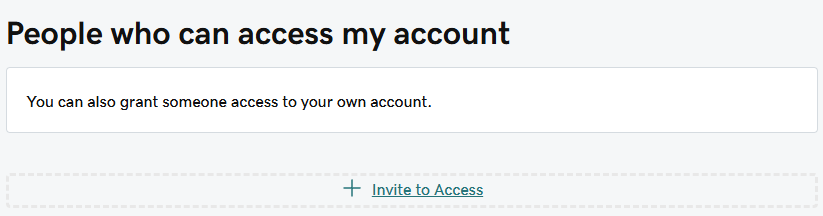
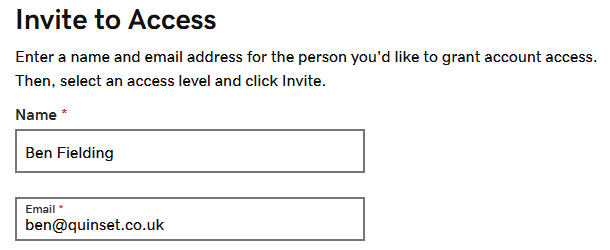
3. Enter the Name and Email address for the person you’re inviting (which is probably Ben if you’re a Quinset customer reading this!)
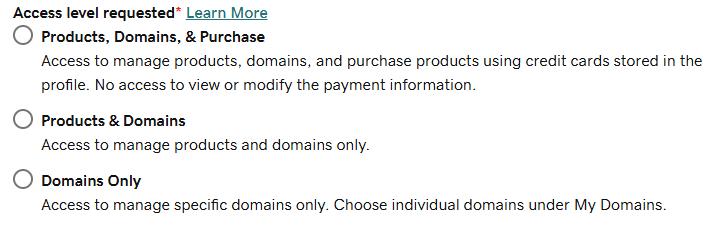
4. Select one of the access levels. If you’re not sure what this means, there’s an explanation at the bottom of this guide.
4. Finally, click the Invite button and that’s it!
GoDaddy Delegate access: Levels of permission
When you invite someone to access your account as a delegate, you need to choose one of the access levels. This determines what a delegate can do in your GoDaddy account.
| Access Level | Description |
|---|---|
| Products, Domains, & Purchase (Quinset Customers: Only if you need help sourcing new domains) | A delegate can: – Make purchases on your behalf using your stored payment method. – Access your products (including product control panels) and cancel new products. – Add or edit your domain’s DNS. For domains, you can allow delegates to handle management actions, transfer actions, or both. |
| Products & Domains (Quinset Customers: Only needed if you need help with 365 bought through GoDaddy) | A delegate can: – Access your products (including product control panels) and cancel new products. – Add or edit your domain’s DNS. For domains, you can allow delegates to handle management actions, transfer actions, or both. |
| Domains Only (Quinset Customers: This is generally all we need) | A delegate can: – Access your products (including product control panels) and cancel new products. – Add or edit your domain’s DNS. You can allow a delegate to handle management actions, transfer actions, or both. |
No matter what access level you grant, your delegate cannot:
- Accept an incoming domain transfer from another registrar or GoDaddy account
- Manage or add payment methods to your account
- Invite others to access your account
- View or change your account credentials (like your password or Support PIN)
- View your order history
- Upgrade products (only new purchases and renewals are supported)
Still need help?
If you’re struggling to delegate your GoDaddy access, or need help with email deliverability, DNS or general email nerdiness, get in touch today.